

CRM vs VMS: What's the Difference, and Do You Need Both?
A CRM and a volunteer management solution (VMS) aren't competing for the same job. A CRM runs donor and supporter relationships. A VMS runs the day-to-day volunteer lifecycle: scheduling, screening, training, and recognition.
Most health and cause-led charities that pair a CRM with Salesforce NPSP or Blackbaud eventually find the CRM alone can't carry volunteer operations at scale, which is where a purpose-built VMS closes the gap.
Key topics covered:
What is a CRM vs a VMS?
A CRM manages donor and supporter relationships. A VMS manages the volunteer lifecycle: scheduling, screening, training, and recognition.
Examples of CRMs
What are some examples of CRM and VMS platforms?
Why a CRM and a VMS are equally important
Do you need both a CRM and a VMS?
What's the difference between a CRM and a VMS?
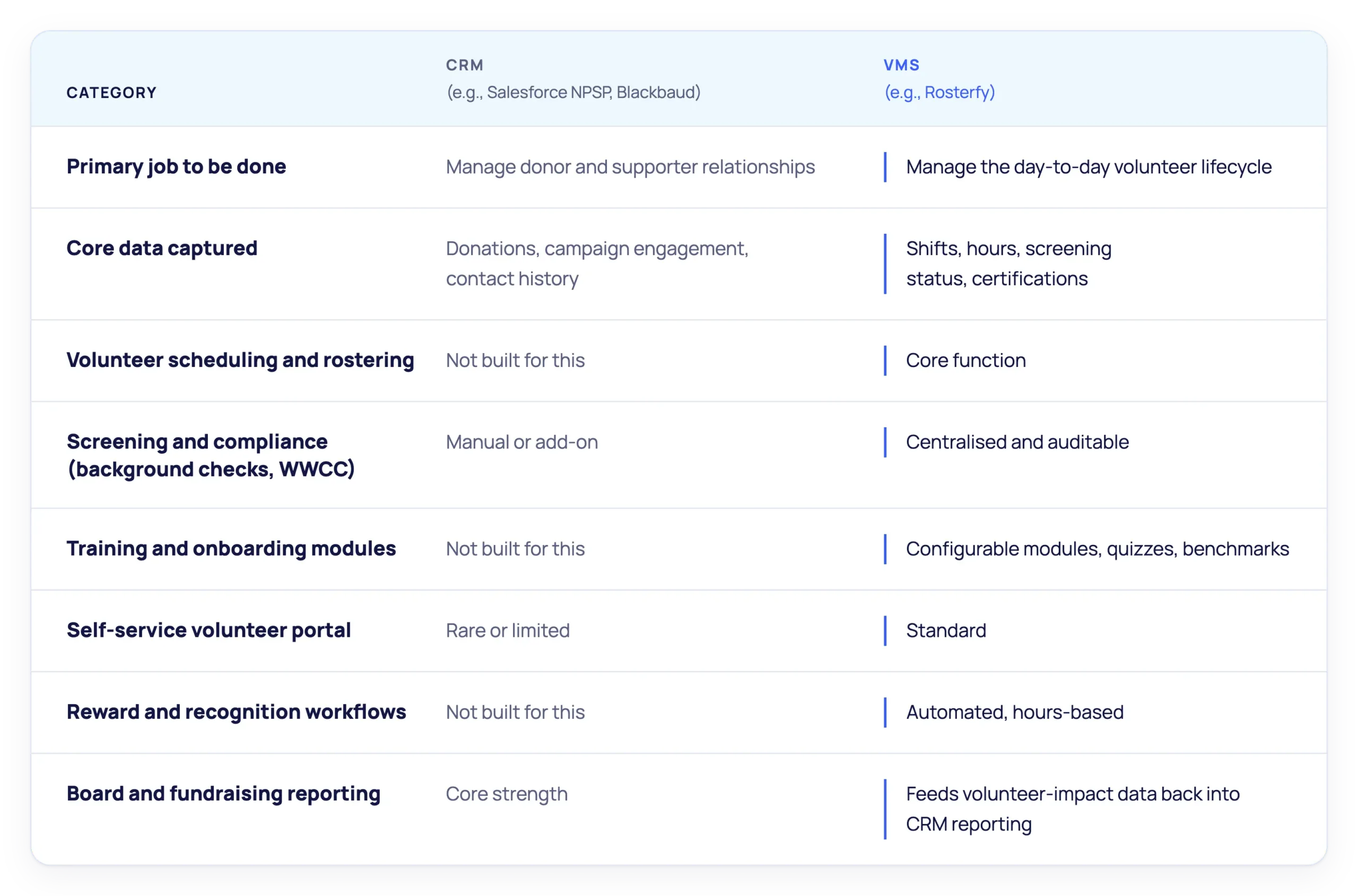
A CRM (Customer Relationship Management platform) is built to manage donor and supporter relationships: giving history, campaign engagement, and contact records. A VMS (Volunteer Management Solution) is built to run the operational side of a volunteer program: rostering, screening and compliance, training, and reward and recognition. They capture different data and solve different problems, even though both often sit inside the same nonprofit tech stack.

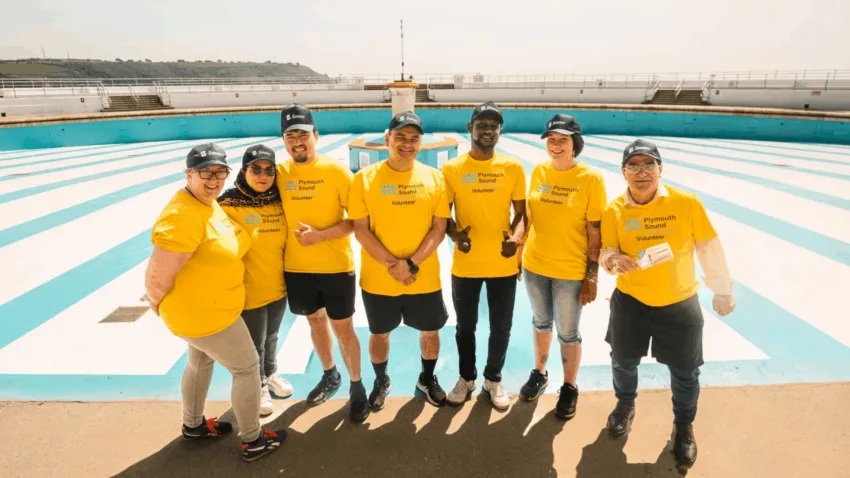
Volunteers play a pivotal role in nonprofits and healthcare charities, just as donors and fundraisers do.
Do I need a VMS if I already have a CRM?
Yes, if your volunteer program has outgrown what a CRM’s volunteer module can handle. Platforms like Salesforce NPSP and Blackbaud are genuinely strong at fundraising, donor stewardship, and reporting, but volunteer coordination is a secondary feature bolted onto that core, not a purpose-built operational system. Once screening, scheduling, and training start eating a coordinator’s week, that’s the signal a CRM alone is no longer enough.
The average volunteer coordinator at a mid-sized nonprofit spends around 22 hours a week on administration: scheduling, confirmations, no-show follow-up, tracking hours, and reporting.1 That’s more than half a working week spent on tasks that don’t involve directly engaging volunteers, and the workload only grows as volunteer numbers scale.
Why can't my CRM just run volunteer management too?
Because volunteer operations and donor operations are different jobs with different data models. A CRM’s volunteer-tracking features are typically one part of a much broader donor-management platform, not the core focus. For organisations managing complex onboarding, screening, compliance, scheduling, and recognition, that leaves real operational gaps: no centralised compliance audit trail, no self-service volunteer portal, no automated recognition workflow.
That’s why the right question usually isn’t “CRM or VMS.” It’s how the two work together, with the CRM managing the broader supporter relationship and a dedicated VMS managing the volunteer experience and operational workflows.
What does CRM and VMS integration actually look like?
CRM and VMS integration means two-way sync between your existing CRM (and adjacent tools like DocuSign or background-check providers) so volunteer and donor data update automatically, without double-handling.
In practice, that covers five areas:
- Integrations: two-way sync with the existing CRM so volunteer and donor data stay current on both sides, without manual re-entry.
- Volunteer portals: a self-service account volunteers use to update documentation, apply for shifts, and access training and certificates, ideally across multiple programs from a single sign-up.
- Screening and compliance: centralised, auditable tracking of background checks, reference checks, and safeguarding or working-with-children clearances, instead of a manual, site-by-site process.
- Training and onboarding: configurable modules, quizzes, and interview scheduling that move a volunteer from application to cleared-to-work without a coordinator chasing every step by hand.
- Reward and recognition: automated tracking of hours and milestones, which the sector’s own research increasingly ties to volunteer retention.
Individually, none of these tasks is demanding. Together, they create hours of repetitive admin every week. Automation is what changes that, handling the routine follow-ups so coordinators spend less time on spreadsheets and more time with volunteers.
For the technical detail on connecting Rosterfy to your existing CRM, see Unlocking VMS-CRM Integration and the Salesforce Integration page.

How do I roll out a CRM + VMS integration?
Enterprise (federated organisations, multiple centres or regions): a phased rollout is usually the better approach. Map how data will sync between your CRM and VMS, onboard teams or locations in stages, and involve IT and CIO stakeholders early, particularly where compliance and data management are involved.
Mid-market (smaller or single-network organisations): start small. Begin with your busiest program or largest volunteer group, demonstrate the time savings, then expand the integration as your team becomes familiar with the new workflows.
Want to share this with your team?
Download the full guide as a PDF — same content, ready to print or forward.
Frequently Asked Questions
No. A VMS doesn’t replace a CRM; it’s the operational layer that syncs with it. The CRM continues to manage donor and supporter relationships while the VMS runs volunteer scheduling, screening, training, and recognition.
Salesforce NPSP is built primarily for donor and fundraising management, with volunteer tracking as a secondary feature. A dedicated VMS is purpose-built for the volunteer lifecycle: rostering, compliance tracking, training modules, and a self-service volunteer portal, which NPSP doesn’t natively provide.
A purpose-built VMS is designed to integrate with the CRM platforms nonprofits already run, including Salesforce NPSP and Blackbaud’s donor-management suite, syncing volunteer and donor data between systems rather than requiring a switch away from either.
Results vary by organisation, but British Heart Foundation reduced volunteer-program admin by around 50% after automating onboarding and compliance tracking. Time savings from CRM + VMS integration specifically will depend on how much manual double-entry your team is doing today.
WHITE PAPERS
Explore similar resources









REQUEST A DEMO
Ready to map your CRM against a volunteer workflow?
Book a discovery call and bring your current CRM setup and volunteer onboarding process.