How to write an RFP for volunteer management software
Breaking down the elements of a good Request for Proposal (RFP), so you get the right volunteer management system for your needs.

Key topics covered:
What should a volunteer management software RFP include?
Everything suppliers need to respond accurately, from your objectives and programme profile to your existing systems and stakeholders. Built for Australian and New Zealand organisations managing volunteers at scale.
Requirements across the full volunteer lifecycle
Ready-to-use requirements for recruitment, screening, onboarding, rostering, check-in, communications, recognition and reporting. Each one can be marked Must, Should or Could, so suppliers can see what matters most.
Compliance, privacy and security for AU/NZ
Requirements for Working with Children Checks by state, police checks and NZ Police vetting, along with Privacy Act obligations, local data hosting and SSO.
How to evaluate and compare suppliers
Weighted evaluation criteria, a requirements response matrix and a three-year pricing schedule, so you can compare proposals like for like.
What is an RFP for volunteer management software?
An RFP (Request for Proposal) is a document that sets out the features, functions and scope your organisation needs from a volunteer management system (VMS). Providers use it to respond with a proposal that fits. A well-considered RFP helps you choose a VMS that meets your requirements, can evolve with your needs and doesn’t charge you for functionality you don’t need.
Key takeaways
- A good VMS RFP covers nine sections, from your organisation overview to how you’ll evaluate proposals.
- Sort features into must-haves, nice-to-haves and what you definitely don’t need.
- Plan for more than features. Onboarding, data migration and integrations decide whether the project succeeds.
- Work backwards from any fixed deadline and leave room for setup, training and testing.
- Keep it simple and focused. It doesn’t need to be a 40-page document.
Why does a good RFP matter?
Your RFP becomes the single source of truth for your organisation and every provider you speak to. Putting the work in upfront saves a lot of time and confusion later. A good RFP delivers:
- Clarity: your whole team, including leadership, agrees on what’s needed.
- Consistency: providers know exactly what you’re looking for.
- Comparison: it’s easier to compare different solutions and prices.
- Confidence: you avoid costly mistakes by not missing critical requirements.
If you’ve never written an RFP, don’t stress. Many volunteer managers have built their careers through hands-on experience, not procurement processes.
What should an RFP for volunteer management software include?
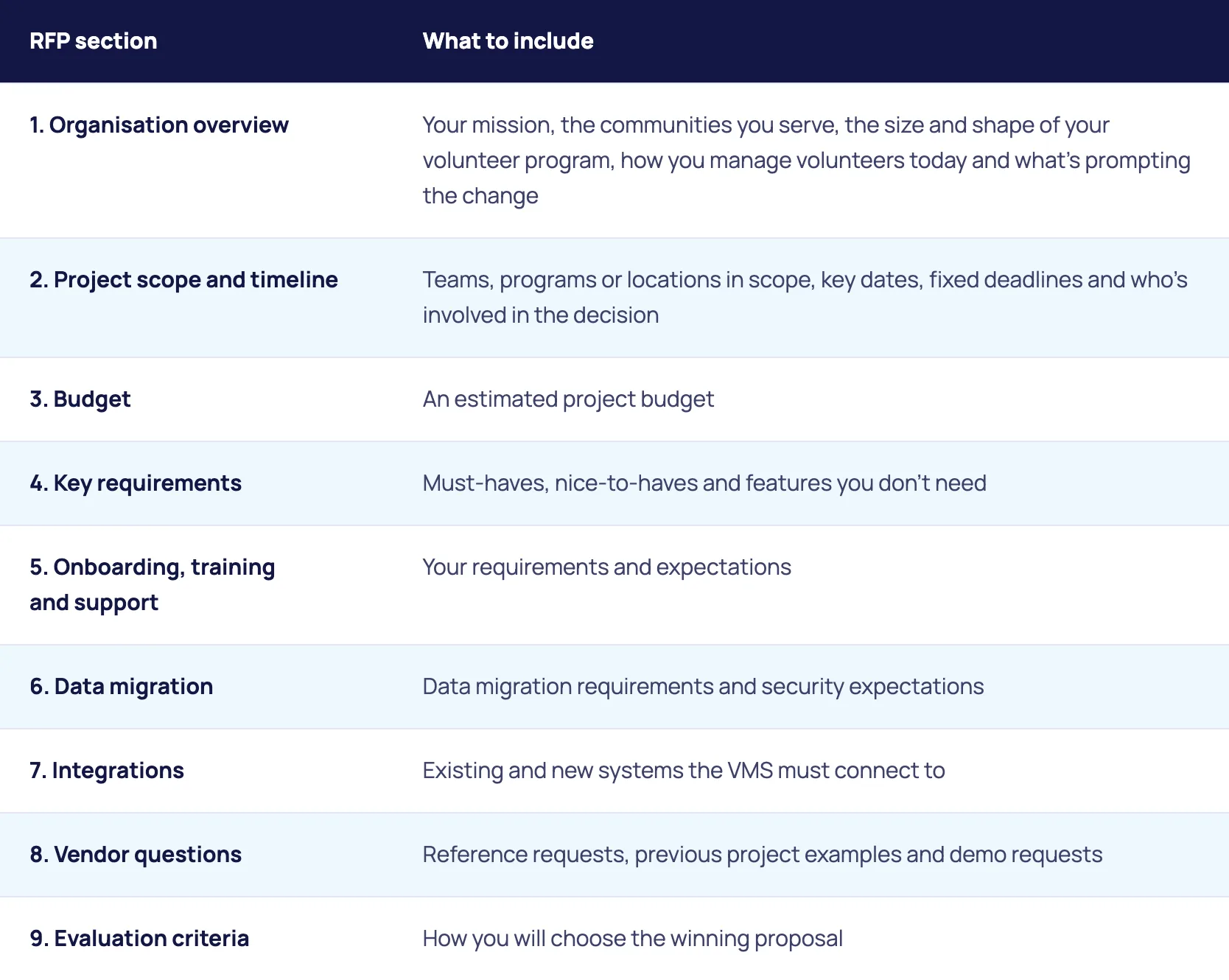
An RFP for volunteer management software should include nine sections. Use this structure as your starting point.
Organisation overview
Tell providers who you are so they can tailor their response rather than send a generic pitch. Include your mission, the number of volunteers you have, the types of roles, your locations and whether volunteering is ongoing, seasonal or event-based. Explain how you manage volunteers today, whether that’s spreadsheets, forms and email or an existing system, and the goals you want a new system to help you reach. Keep it to a page or less.
Project scope and timeline
Set out which teams, programs or locations the system will support at launch and any you plan to add later. List key dates: when the RFP closes, when you’ll shortlist, when demos will run, when you’ll decide and your target go-live date. Name any fixed deadlines, such as a major event, a peak season or the end of a contract with your current system. If you need to go live before a key event, work backwards from that date and leave room for setup, training and testing.
Budget expectations
Share a ballpark figure if you can. It gives providers a realistic sense of which solutions are viable for you. Much of the value of a VMS comes from automating manual tasks, so set your budget in line with the savings you want to create, not just the upfront cost of a system. Rosterfy can provide projected cost savings based on benchmarking against similar clients, or you can estimate your own with our ROI calculator.
Critical functionality requirements
Identify your current weak spots and where you have the most to gain. Ask three questions: what are the must-haves, what would be nice to have, and what do you definitely not need? The most common VMS features to consider are:
- Volunteer recruitment and onboarding
- Scheduling and shift management
- Mobile app access for volunteers
- Event, program and campaign management
- Volunteer engagement tools, including certificates and reward and recognition
- Volunteer training and credential tracking
- Communication tools (email, SMS)
- Automation of administrative tasks
- Reporting and analytics
- Privacy and security compliance
Onboarding, support, data and integrations
A VMS only adds value if your team knows how to use it well. Ask providers to outline their onboarding and setup process, training options, ongoing support channels (live chat, email, phone) and how they help users after launch. If you’re moving from spreadsheets or a legacy system, cover data migration assistance, data security and privacy protocols, and user permissions and access levels. Finally, list the fundraising, HR, accounting and other systems your VMS must connect to, and ask how custom integrations are handled. See Rosterfy’s 50+ integrations and our client onboarding process.
Vendor questions and evaluation criteria
Use a vendor questions section for anything that doesn’t fit elsewhere, such as case studies from similar organisations, a demo using a sample of your real data, how customisation requests are managed and the platform’s development roadmap. Then state how you’ll assess proposals. Common criteria include cost for today’s scope and likely future scope, alignment with your must-haves, experience with similar organisations, quality of support and training, and client references. For a weighted scorecard and the questions to ask in a demo, see our buyer’s guide to choosing volunteer management software.

How should you work with providers during an RFP?
Treat your RFP as a conversation starter, not a fixed document. It’s OK for it to evolve as you learn what different platforms can do. Leading providers will work with you to validate your requirements, suggest new ways of doing things, highlight features you might not have thought of and plan an onboarding journey that works for your volunteers and team.
Five tips for a successful RFP
- Keep it simple and focused. It doesn’t need to be a 40-page document.
- Prioritise needs over wants to keep things realistic.
- Set clear timelines and expectations for providers.
- Be open to collaboration and suggestions.
- Trust your instincts. The right partner will feel like a natural fit.
Download the free RFP guide and template
The full guide includes every section above in more detail, plus a ready-to-use RFP structure for volunteer management systems. It's free to download, with no form to fill in.

Frequently Asked Questions
RFP stands for Request for Proposal. It’s a document that sets out the features, functions and scope you need from a system, so providers can respond with a proposal that fits.
Keep it simple and focused. An RFP doesn’t need to be a 40-page document, and your organisation overview should be a page or less. Providers need enough to understand your world, not your full annual report.
Yes. Rosterfy’s free guide, Understanding RFPs for volunteer organisations, includes a nine-section RFP structure you can use as a starting point. It covers your organisation overview, scope and timeline, budget, key requirements, onboarding and support, data migration, integrations, vendor questions and evaluation criteria.
Start early enough to work backwards from your target go-live date. If you need to go live before a major event, a peak season or the end of your current system’s contract, leave room for shortlisting, demos, a decision, and then setup, training and testing.
Yes. It’s OK for your initial RFP to evolve as you learn more about what different platforms can do. Good providers will help you validate your requirements and highlight features you might not have thought of.