![Rosterfy_Logo_White.png]](https://www.rosterfy.com/hs-fs/hubfs/Logos/Rosterfy%20Logos/Rosterfy_Logo_White.png?height=40&name=Rosterfy_Logo_White.png)
Before you can allocate a Reward, you must first create a Reward Item
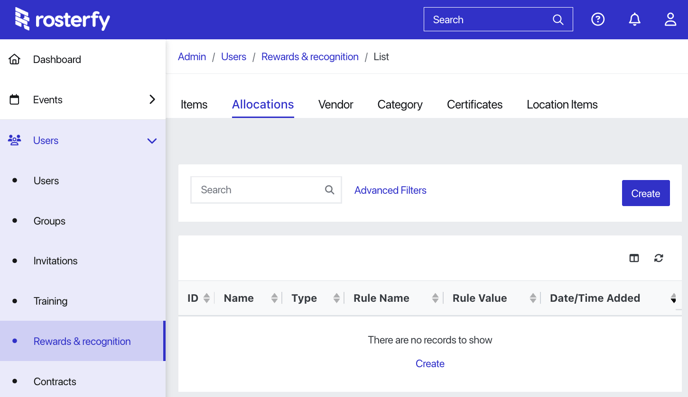
To set up reward allocation, go to Users > Reward & Recognition > Allocations > Create.
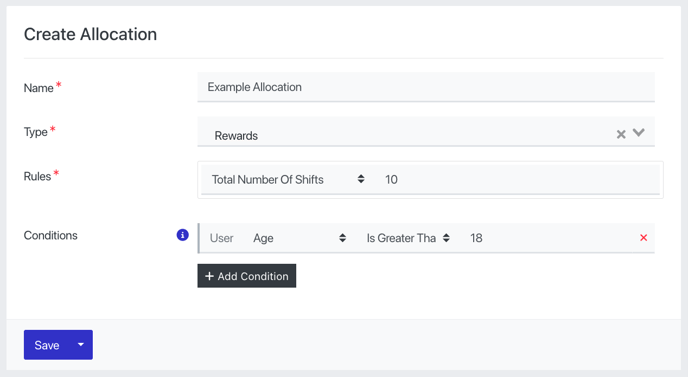
- Enter a name for the Allocation.
- Select 'Rewards' as the type of allocation.
- Select the rule that determines the allocation:
- Total Number of Shifts
- Total Number of Events
- Total Shift Hours
- Total Shift Hours per Day
- Add Conditions that must be met for the allocation to to apply. For example, 'Age is greater than 18'.
- Click Save.
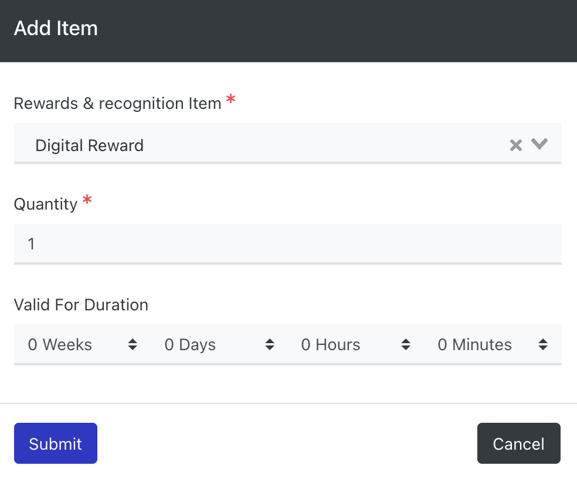
Selecting the Item/s to Allocate
- Scroll down to the Items section and click Add.

- Select the Reward & Recognition Item
- Select the Quantity you want to allocate
- Enter a time duration if applicable
- Click submit
Note: Reward points earned for hours worked at events are rounded to the nearest hour. For instance, if a user works for 67 minutes, this will be rounded up to 1 hour, while 92 minutes will round up to 2 hours.